I'm rebuilding DOGWALK — Blender Studio's short game about walking a dog — as a 2D game in Compose Multiplatform.
Not in Godot. Not in Unity. Not on a SurfaceView with OpenGL underneath. In plain Compose, with engine/ and game/ living entirely in commonMain, no expect/actual, no platform imports, shipping to Android and Desktop from the same source.
The obvious question is why, and the honest answer is that I wanted to know whether Compose could actually take it. It turns out it can — but only if you get three specific things right.
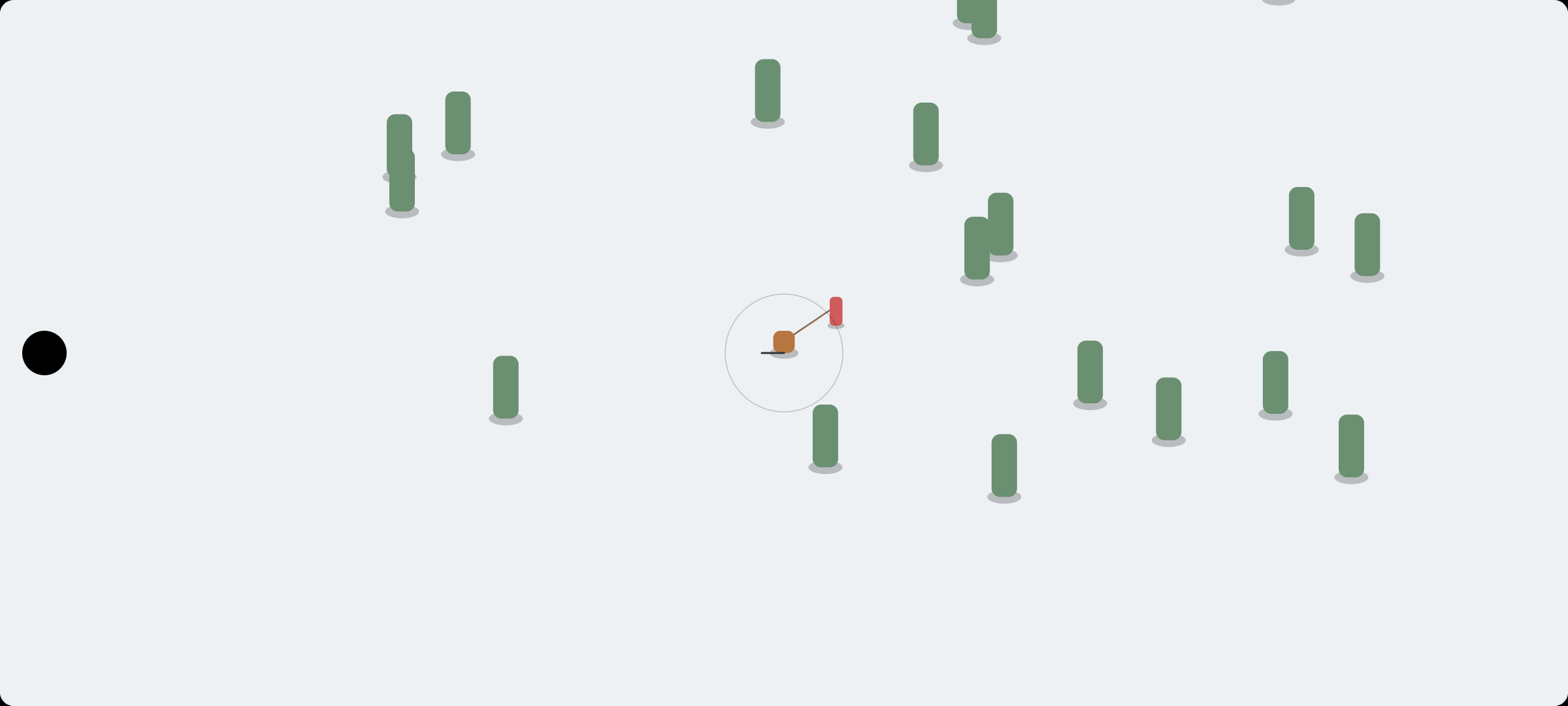
That screenshot is the whole game loop working. A brown blob you drag to move, a red blob dragged behind it on a leash, green blobs you pass in front of and behind. It looks like nothing. It's the most important build in the project.
1. withFrameNanos is the game loop#
Every game needs a heartbeat. On Android you'd normally reach for Choreographer, a render thread, or a SurfaceView with its own draw loop.
Compose already has one:
LaunchedEffect(game, paused) {
    if (paused) return@LaunchedEffect
    var lastNanos = withFrameNanos { it }
    var accumulator = 0f

    while (coroutineContext.isActive) {
        withFrameNanos { now ->
            val frameTime = ((now - lastNanos) / 1_000_000_000.0)
                .toFloat()
                .coerceAtMost(MAX_FRAME_TIME)
            lastNanos = now
            accumulator += frameTime
            // ...
        }
    }
}
withFrameNanos suspends until the next frame and hands you the frame time. A LaunchedEffect looping on it gives you a vsync-aligned callback, cancelled automatically when the composable leaves the tree. No thread to manage, no lifecycle to wire up.
That coerceAtMost(MAX_FRAME_TIME) matters more than it looks. If the app is backgrounded or the GC stalls for two seconds, an unclamped accumulator would try to catch up two seconds of simulation in one frame, which takes longer than a frame, which grows the backlog further. That's the classic death spiral. Clamping at 0.25s means a hitch stays a hitch instead of becoming a freeze.
2. Simulation and rendering are different jobs#
The Game contract has two methods, and the split is the whole point:
interface Game {
    fun update(dt: Float, input: InputState)   // fixed 60Hz, deterministic
    fun render(scope: DrawScope, alpha: Float) // once per display frame
}
update runs on a fixed timestep. Same dt every time, so physics and movement are deterministic and reproducible — a leash constraint that's stable at 60Hz stays stable regardless of what the display is doing.
render runs once per display frame with an alpha between 0 and 1, interpolating between the last two simulation states.
var steps = 0
while (accumulator >= FIXED_DT && steps < 8) {
    input.beginStep()
    game.update(FIXED_DT, input)
    accumulator -= FIXED_DT
    steps++
}
On a 120Hz phone the simulation still ticks 60 times a second, but you get 120 interpolated frames of smooth motion. Tie movement to frame time instead and your game literally behaves differently on different hardware — the dog moves further per second on a 120Hz device than a 60Hz one. That's not a performance bug, it's a correctness bug.
3. Redraw without recomposition#
This is the one that decides whether the whole approach is viable or a toy.
The naive version drives the frame counter through state that composition reads, which means every frame recomposes. At 60fps, that's 60 recompositions a second, each allocating, each running layout. It works, and it's awful.
Instead:
// Read inside the draw lambda to invalidate only the draw phase each frame.
var frameTick by remember { mutableIntStateOf(0) }

Canvas(modifier) {
    frameTick        // <- the read that matters, inside draw
    game.render(this, alphaHolder[0])
}
frameTick is snapshot state that is only ever read inside the draw lambda. Compose tracks where a state read happens, so changing it invalidates the draw phase alone — no recomposition, no relayout, effectively nothing allocated in a steady-state frame.
If you ever find yourself reading game state during composition instead of during draw, you've lost it. That single distinction is what makes Compose a plausible 2D renderer.
Blobs first, art later#
Nothing in that screenshot is art. That's deliberate.
Placeholder rendering is a Placeholder.kt that draws coloured shapes, and it let me get the leash constraint, the Y-sorted depth ordering, the camera follow and the 8-direction facing all working before a single sprite existed. When the art pipeline lands, it swaps in behind an Atlas and nothing else changes.
The other thing that made this pleasant: developing on Desktop.
./gradlew :composeApp:runAbout two seconds to a running window, against a Gradle install plus emulator deploy for Android. When you're tuning how a dog feels to move — and that's a thing you tune by feel, twenty times in a row — that difference decides whether the project survives its first week.
What's next#
The art is the interesting part, and it's a strange pipeline: DOGWALK is a 3D Blender project, so the plan is rendering each character from 8 directions orthographically, trimming and packing the results into a sprite atlas, and sampling that at runtime.
It works because of what DOGWALK's art already is — top-down, papercraft (scanned real paper, flat and high-contrast rather than PBR-realistic), and animated at a deliberately low frame rate. Ten frames per animation instead of sixty means rendering all eight directions is cheap, and the stepped look is the intended style rather than a compromise.
That's part 2.
DOGWALK's source bundle is CC BY 4.0 and the scripts are MIT, so derivatives and commercial use are allowed — with attribution: Assets derived from DOGWALK — (CC) Blender Foundation | studio.blender.org/dogwalk. Worth reading the licence yourself before you build on someone's work.
The repo is public and follows along as I go: github.com/johnkenedy/DogWalk
Until then, let's make this work.